
Download Vizbull – AI Photo‑to‑Cartoon Generator, Free Online Art Tool
Overview
Vizbull is a cloud‑based AI art generator that instantly converts ordinary photographs into vivid cartoons, paintings, sketches, or stylized illustrations. The service leverages deep‑learning models trained on millions of images, enabling it to recognize key visual elements—faces, objects, textures—and re‑render them in a chosen artistic style within seconds. Designed for both casual creators and professional designers, Vizbull removes the steep learning curve associated with traditional raster editors while preserving the quality required for commercial projects. Users simply upload a JPEG or PNG, pick from a library of over 30 pre‑built filters, and receive a high‑resolution output that can be downloaded, shared directly to social platforms, or exported as a layered PSD for further refinement. The platform operates entirely in the browser, meaning there is no need to install bulky software; all heavy processing runs on secure cloud servers that encrypt data in transit and delete it after 24 hours. A generous free tier provides up to 15 conversions per day at 1080p resolution, while premium subscriptions unlock batch processing, custom‑style training, and 4K export. By combining speed, flexibility, and privacy‑first architecture, Vizbull positions itself as a go‑to solution for anyone looking to add AI‑driven creativity to their visual workflow.
Key Features & Benefits
- AI‑Powered Artistic Styles: More than 30 filters, including watercolor, comic‑book, oil‑painting, pop‑art, and sketch.
- One‑Click Transformation: Upload, select a style, and receive a result in under 10 seconds.
- Batch Processing (Premium): Convert up to 50 images simultaneously, perfect for marketing campaigns.
- Custom Style Training: Upload reference artwork to teach Vizbull a unique visual language for brand consistency.
- High‑Resolution Export: Free tier supports up to 1080p; premium users can download 4K PNG or lossless TIFF files.
- Cross‑Platform Accessibility: Works on any modern browser (Chrome, Edge, Safari, Firefox) across Windows, macOS, Linux, Android, and iOS.
- Secure Cloud Processing: Images are encrypted during upload and automatically erased after 24 hours.
- Social‑Media Integration: Direct sharing buttons for Instagram, TikTok, Facebook, and Twitter.
- Layered PSD Export (Premium): Preserve individual style layers for further editing in Photoshop or GIMP.
- Flexible Pricing: Free plan, monthly, or annual subscriptions with a 30‑day money‑back guarantee.
The practical benefits of these features extend far beyond the feature list. Graphic designers no longer waste hours hand‑tracing photos; the AI does the heavy lifting, allowing more time for composition and storytelling. Social‑media managers can generate eye‑catching posts in minutes, boosting engagement without outsourcing illustration work. Brands benefit from style consistency across large batches, ensuring every visual adheres to corporate guidelines. Because processing occurs on the cloud, local hardware limitations are irrelevant, making Vizbull accessible to freelancers using modest laptops or even tablets. The combination of speed, quality, and cost‑effectiveness makes Vizbull a compelling addition to any visual‑creation toolkit, whether you’re crafting a personal avatar or delivering a full‑scale advertising campaign.
Installation, Usage & Compatibility
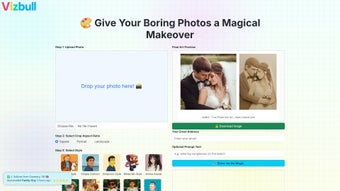
Vizbull requires no installation. Users simply navigate to vizbull.com, create an optional account, and begin converting images immediately. The onboarding wizard walks new users through the upload process, explains the style selector, and demonstrates how to download or share the final artwork. Premium subscribers see an additional “Batch” tab that enables multi‑file selection and bulk style application.
Step‑by‑step usage guide:
- Visit the Vizbull homepage and click “Sign Up” or “Log In”.
- Drag and drop a JPEG or PNG into the upload zone, or click “Choose File”.
- Browse the style gallery on the right; hover over thumbnails for live previews.
- Select a style and press “Apply”. A circular loader indicates processing progress.
- When finished, preview the transformed image and choose “Download”, “Share”, or “Export PSD”.
- Premium users can add multiple files, assign a common style, and launch batch conversion.
Because the service runs in the browser, system requirements are minimal. Any device that supports WebGL and HTTPS can access Vizbull. The following compatibility table summarizes supported operating systems and browsers:
| Operating System | Supported Browsers |
|---|---|
| Windows 10/11 | Chrome, Edge, Firefox, Safari (via Edge) |
| macOS 12+ | Safari, Chrome, Firefox |
| Linux (Ubuntu, Fedora, etc.) | Chrome, Firefox |
| Android 9+ | Chrome, Firefox Mobile |
| iOS 13+ | Safari, Chrome |
A stable internet connection (minimum 5 Mbps) is recommended for high‑resolution outputs. The responsive design adapts to tablets and smartphones, allowing on‑the‑go transformations without sacrificing functionality. Because all processing occurs remotely, even low‑end devices can generate 4K artwork when subscribed to the premium plan.
Pros, Cons & Frequently Asked Questions
Pros
- Lightning‑fast AI processing with results in seconds.
- Extensive library of artistic styles plus custom‑style training.
- No software download required; works on any device with a modern browser.
- Secure, encrypted handling of user images.
- Generous free tier and flexible premium pricing.
- Batch processing and PSD export streamline professional workflows.
- Direct social‑media sharing cuts down post‑production steps.
Cons
- 4K resolution is limited to paid subscriptions.
- Internet‑dependent; offline use is not possible.
- Custom style training requires a sizable dataset and 24‑48 hours to become effective.
- Free tier imposes a daily conversion limit (≈15 images).
- Advanced color‑grading tools are absent; external editors are needed for fine‑tuning.
Frequently Asked Questions
Is Vizbull really free to use?
Yes. The free plan allows up to 15 image conversions per day, access to most standard styles, and 1080p downloads. Premium features such as batch processing, custom style training, and 4K export require a paid subscription.
Do I need an account to generate artwork?
An account is optional for one‑off conversions, but creating a free account lets you track usage, save style preferences, and unlock premium features.
How secure is my uploaded photo?
All uploads are encrypted via HTTPS, processed on GDPR‑compliant cloud servers, and automatically deleted after 24 hours. Vizbull adheres to both GDPR and CCPA privacy standards.
Can I use Vizbull on a mobile device?
Absolutely. The responsive web app works on Android and iOS browsers, offering the same style selection, preview, and download options as the desktop version.
What file formats are available for download?
Free users can download PNG and JPEG files. Premium subscribers also have access to lossless TIFF and layered PSD exports for deeper post‑processing.
Conclusion & Call to Action
Vizbull combines AI creativity, speed, and browser‑based accessibility to deliver a tool that suits everyone—from hobbyists seeking a quick avatar to agencies producing brand‑consistent visuals at scale. The free tier provides ample opportunity to test the platform, while the premium plans unlock powerful batch and custom‑style capabilities for professional use. With secure cloud processing, cross‑platform support, and seamless social‑media integration, Vizbull eliminates the need for heavyweight desktop software and keeps your workflow lightweight.
Ready to turn your photos into eye‑catching artwork with a single click? Visit Vizbull now, sign up for the free plan, and explore the artistic possibilities. When you’re ready for more power, upgrade to a premium subscription for unlimited conversions, 4K output, and custom style training—all backed by a privacy‑first infrastructure.



.png)



